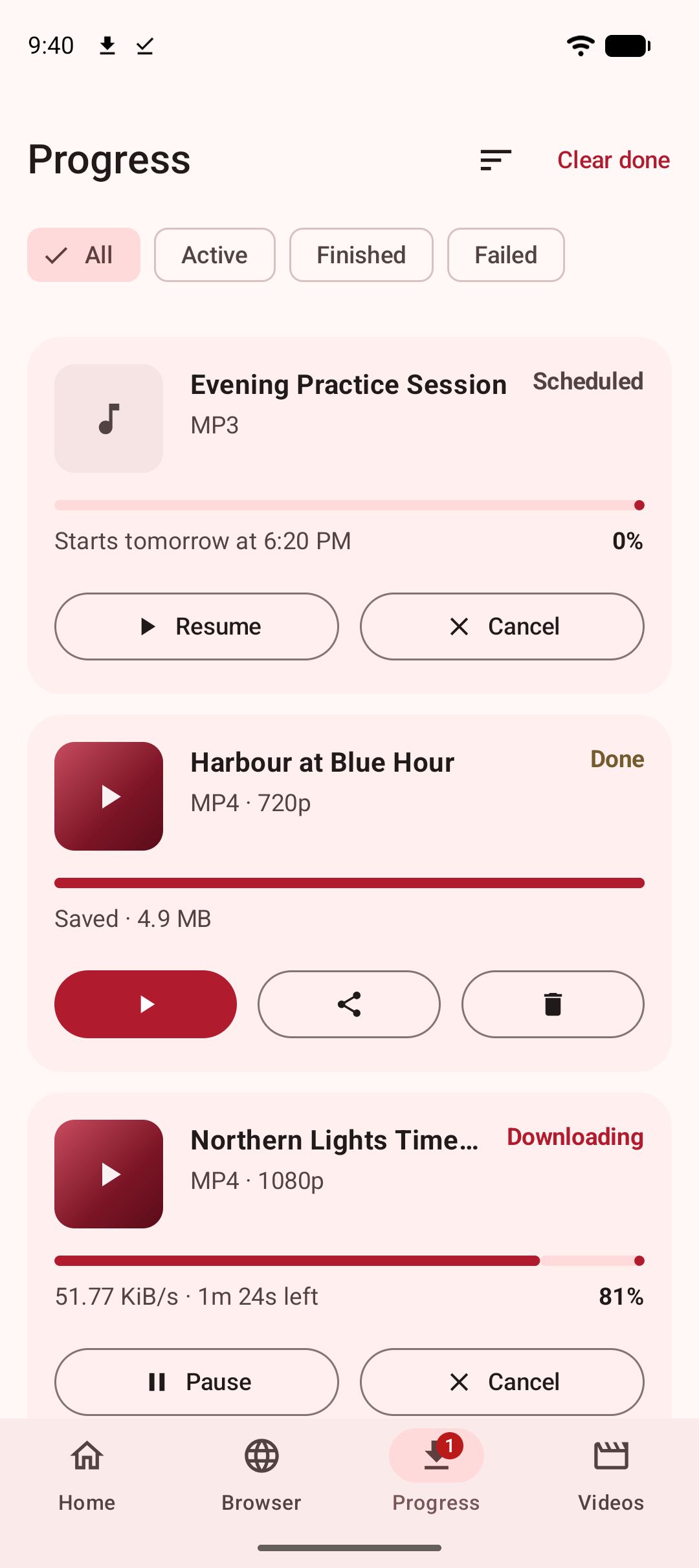
To download a video on Android, check the app you are watching in for its own save option first; if there is none, or it keeps the video locked inside the app, copy the video’s link, paste it into a downloader such as Kite: Video Downloader, pick a quality, and the video lands in your gallery as an ordinary file. That is the whole method. The rest of this guide is everything around it: what the built-in options actually do, how a downloader works and how to choose one, how to read the quality list, where files go, how to keep some of them private, and the rules that apply to all of it. Kite is our app, so read the sections about it as our honest case rather than a neutral review.
Start with the app you are already in
Most apps you watch video in have something called Save or Download, and it pays to understand what each one does, because they are not the same.
A bookmark. Some save buttons only add the post to a list inside your account. Facebook’s Save works this way: the video goes to your Saved list, you still need the app and a connection to watch it, and nothing is written to your phone. Pinterest’s Save on a video pin re-pins it to a board, which is the same idea.
An in-app offline copy. Other apps download a copy you can watch without a connection, but keep it inside the app, in storage only that app can read. The copy disappears if you uninstall the app, lose access, or the platform withdraws the video. It is convenient and it is not a file of yours.
A real file, sometimes. A few apps do write a file to your phone. TikTok’s save does, with a watermark burned in and only where the creator allows it. Instagram lets you save your own reels. Vimeo shows a Download button below a video when its owner has enabled downloads. Twitch lets you download your own clips. When one of these applies, use it; it is the simplest route there is.
What none of them covers is the ordinary case: a public video, made by someone else, that you want as a file on your phone for offline viewing, with no watermark and at a quality you choose. That is the job a downloader does.
What a downloader app actually does
A downloader does not have a copy of the video. It reads the public page behind the link you give it, the same page a logged-out visitor sees, works out where the video stream is and which versions exist, then fetches the one you choose and writes a file. The part that reads pages is called an extractor, and there is one per site, because every site publishes video differently. The engine that most serious Android downloaders share is yt-dlp, an open-source project with extractors for a thousand or so sites, and it is the engine inside Kite, running entirely on the phone.
Two consequences follow from “reads the public page”. A private post, a friends-only video, a closed group or an age-gated page shows a visitor a login prompt rather than a video, so there is nothing to extract, and no downloader app changes what a site publishes. And a live stream is not a file yet; it becomes one when the broadcast ends and a recording is posted.
Two boundaries are drawn on purpose rather than by the site. Kite does not bypass copy protection of any kind: material protected by DRM is declined rather than downloaded. And there are certain large video and music platforms that Google Play policy does not allow downloader apps to touch; Kite deliberately excludes them. That exclusion is why Kite can be on Google Play at all, and it is the single most important thing to know before you install it.
Choosing an app: the questions that actually matter
Feature lists in this category look alike. Five questions separate the apps.
- How does it install and update? An app on Google Play installs like any other and updates itself. Most well-known downloaders are not on Play; they are APK files from their own sites or third-party stores, installed by granting your browser permission to install unknown apps and updated by fetching a new file yourself. Extractors need constant updating to keep pace with sites, so the update path is not a detail.
- Does it play what it saves? A downloader with a token preview screen sends you to a second app for every video. One with a real player, with gestures, a queue, picture-in-picture and screen-off audio, does not.
- Does it need an account? It should not. A downloader has no reason to know who you are.
- How is it paid for? Ads, donations, a purchase. A listing that does not say is leaving you to guess.
- What does it refuse to touch, and does it say so? A clear line is a sign of an app that expects to stay available.
Our roundup of the best video downloader apps for Android puts eight apps against those questions, with every claim about the others taken from their own listings. On the first question, Kite is the one in that list installed from Google Play. On the fourth, Kite is free and supported by ads, a banner and the occasional interstitial, with no paid tier and no account. On the fifth, its two lines are the ones stated above.
Step by step with Kite: Video Downloader
-
Install Kite from Google Play. It runs on Android 7.0 and newer. There is no account and no sign-up. On Android 13 and newer it asks once for permission to show notifications, which is how download progress reaches your notification shade.
-
Get the video to Kite. There are three ways. Share it: in the app you are watching in, tap Share and choose Kite from the Android share sheet. Kite’s quality list rises over that app, you pick, and the sheet closes back into the app you were in while the download runs; our guide to saving a video from the share menu walks through it. Or copy the link, open Kite and tap Paste; with Auto-paste links switched on in Settings, a copied link is pasted as soon as Kite opens. Or add Kite’s Paste & download tile to Quick Settings, and a copied link is one tap away in the pull-down panel. You can paste several links at once, separated by spaces, commas or new lines, or import a text file of links, and each becomes its own download. A playlist link is expanded: Kite lists what is inside and saves the items you tick. Our guide to downloading several videos at once covers batches end to end.
-
Or browse for it. Kite’s Browser tab is a real browser with tabs, bookmarks, history and a choice of search engine, and it blocks advertising and tracking domains as you browse. It watches the pages you visit for playable media and shows a save button when it finds some. Press play on a video, tap save, and you are at the same quality list as the paste route. This is the way to save a video from a page that offers no link to copy, and our guide to downloading a video from a web page on Android covers it in depth.
-
Pick what you want. Kite lists every version the source offers, from SD up to 4K where the source has it, each with its container, codec and an estimated size, so you know what you are getting before it starts. Choose a resolution, or choose MP3 to keep only the sound, with title and artist metadata embedded. Where a video carries captions, choose a language and Kite writes them into the file. A trim range saves the minute you came for rather than the hour around it, and a scheduler starts the download at a time you set.
-
Leave it running. Downloads keep going in the background and survive closing the app. Progress, speed and time remaining appear in the notification shade, where pause, resume and cancel sit too. An interrupted download picks up where it left off rather than starting over. Up to three run at once by default; you can change how many, cap the bandwidth each may use, and hold everything to Wi-Fi so mobile data is never spent on a download you did not mean to start.
-
Find it and watch it. Finished videos and MP3s land in a Kite folder inside the phone’s Download folder, so your gallery and file apps see them as ordinary files. Kite’s Videos tab lists them alongside every other folder of video and music on the phone, with a file count per folder and a search box, and plays anything in place. Kite asks for access to your videos and music the first time you open that tab, and for nothing beyond them.
Reading the quality list
The format sheet is where most of the decisions happen, so it is worth knowing what its columns mean.
Resolution is the height of the picture: 480p, 720p, 1080p, 2160p for 4K. On a phone screen, 1080p is usually the sensible ceiling. 4K files are several times larger and only look different on a display that can show the extra detail.
Container is the file type, usually MP4 or WebM. MP4 opens everywhere. WebM is common on the web and plays in most modern players, but an older TV or car system may not know it.
Codec is how the picture is compressed. H.264, often written avc1, plays on nearly anything. VP9 and AV1 give smaller files at the same quality, and newer phones handle them well; older ones may stutter or refuse. If a saved video will not play somewhere, the codec is the first thing to suspect.
Estimated size is what the download will cost in storage. For streams it is worked out from bitrate and length, so treat it as a close guide rather than a promise.
When in doubt, choose the MP4 entry at 1080p or 720p. It plays everywhere and the file stays manageable.
Saving only the sound
A great deal of what people save is really listening material: talks, lectures, interviews, long messages. Choose MP3 on the format sheet and Kite pulls the audio out at download time with title and artist metadata embedded, so the file arrives named properly. A video you have already saved can be converted to MP3 later from the library, on the phone, with no upload and no second app. Saved MP3s keep playing with the screen off, with controls on the lock screen, in the notification shade and over Bluetooth, and a saved video can be played the same way with one tap when you only want the sound. Our guide to converting a video to MP3 on Android covers both paths.
Watching, and keeping some of it private
Kite’s player is built for the files it saves and for the video already on your phone. Swipe for brightness, volume and seeking, press and hold for double speed, skip ten seconds either way, pop a video out into picture-in-picture, and the videos saved alongside queue up behind the one playing. Kite remembers where you stopped, and there is a sleep timer. Newer additions: the player’s menu can repeat a section of a video or lock the screen against stray taps, two fingers pinch to zoom in on the picture, and on the audio side there is an equaliser with bass boost.
Some saved videos should not sit in the gallery. Kite’s Private Vault takes a file from the Videos tab in one step: it is encrypted on this device, hidden from the gallery, file apps and the Videos tab, and locked behind a PIN. Once the vault is set up, the format sheet also offers Save to Private Vault, which sends a new download straight into it, so the file never appears in the gallery at all; our guide to downloading videos privately explains how that and Kite’s private browser tabs fit together. The vault lives only on this phone, is never backed up, and has no reset; if you forget the PIN, the files are gone. That strictness is the point, and it is worth knowing before you use it.
Platform notes
Each site has one habit worth knowing, and we have a guide for each.
- TikTok stamps its own save with a watermark. A downloader saves the stream the page plays, which for most public videos is the clean version; our TikTok guide explains when that is not so.
- Reddit serves picture and sound as separate streams, which is why so many Reddit downloads come out silent. Kite merges them.
- Instagram and Facebook extract when the post is public. Friends-only, private-account and closed-group posts do not, and no setting changes that.
- X (formerly Twitter) serves GIFs as short videos, so they save as MP4.
- Pinterest pins are not all videos. Video pins download; image pins have nothing to download; link pins point at another site, where the real page is.
- Twitch clips download in seconds. Past broadcasts are long, so check the estimated size and use the trim range.
- Vimeo shows its own Download button below a video when the owner allows it, and that button comes first.
When a download fails
Run four checks before blaming the app. Does the link open the video’s own page in a normal browser, rather than a feed, a profile or a redirect? Does it play in a private tab with no login? Is it a recording rather than a live stream? Is the Wi-Fi-only option holding the queue while you are on mobile data? If all four pass and the same site fails while others work, the app’s extractor for that site is out of date, and only an update fixes that. Our guide to why video downloaders stop working goes through every cause with its fix.
The rules
Downloading is a tool, and the rules belong to the tool’s user. Save only content you own or have permission to save, respect the terms of the sites you visit, and respect the rights of the people who made what you are watching. A saved video is for your own offline viewing, not for re-uploading somewhere else with the credit filed off. Kite does not bypass copy protection of any kind: material protected by DRM is declined rather than downloaded. And it deliberately excludes certain large video and music platforms that Google Play policy does not allow downloader apps to touch, which is the price of being an ordinary app on an ordinary store, installed and updated like everything else on your phone.