The shortest way to download a video on Android starts with the share menu you already use. Tap Share on the video, choose Kite: Video Downloader, and a sheet slides up over the app you are in, listing every resolution the source offers plus an MP3 option. Tap one and the sheet closes: you are back where you found the video, and the download runs in the background. Kite is our app, so read this as our description of how it works rather than a neutral review.
Why the share menu is the shortest route
Copy and paste works, but it is a round trip: copy the link, leave the app, open a downloader, paste, choose, then find your way back to what you were watching. Android has also narrowed the clipboard for privacy reasons. Google’s developer documentation says that from Android 10, an app cannot read the clipboard unless it is the app currently in focus or the keyboard, and that from Android 12 the system shows a short “pasted from your clipboard” message the first time an app reads something another app copied. Sharing hands the link over directly, so none of that is in the way.
Kite handles a shared link in a sheet over the other app instead of opening its full screen, and nothing about the download differs from one started inside the app. The sheet exists to get you back to what you were doing.
What you need
- Kite: Video Downloader from Google Play. It runs on Android 7.0 and newer, needs no account, and is free, supported by ads: a banner and the occasional interstitial inside the app.
- A public video with a Share button. Links from TikTok, Instagram, X (formerly Twitter), Reddit, Facebook, Vimeo, Twitch and Pinterest work, as do the thousand or so other sites Kite’s engine, yt-dlp, recognises. The same share works from a browser.
- Nothing else. On Android 13 and newer, Android may ask once whether Kite can show notifications. The download runs whatever you answer; the notification is simply where its progress appears.
Step by step: share to Kite
- Tap Share on the video. In most apps it is an arrow icon or a Share item beside the video or in its menu.
- Choose Kite. If it is not in the first row of the share menu, scroll along or tap More. Many phones let you pin an app to the front of that menu with a long press; the wording varies by phone maker.
- Let Kite read the link. The sheet says “Reading the link…” for a moment. Apps often share a caption along with the link, and that is fine: Kite picks the link out of the text.
- Choose what to save. The sheet lists every resolution the source offers, each with its container, codec and an estimated size, plus MP3. Rows above the list let you pick subtitles when the video has them, trim it to a range, set a start time and, once you have set up the Private Vault, save the file straight into it.
- Tap the download button beside your choice. A short “Download started” message appears, the sheet slides away and you are back in the app you shared from.
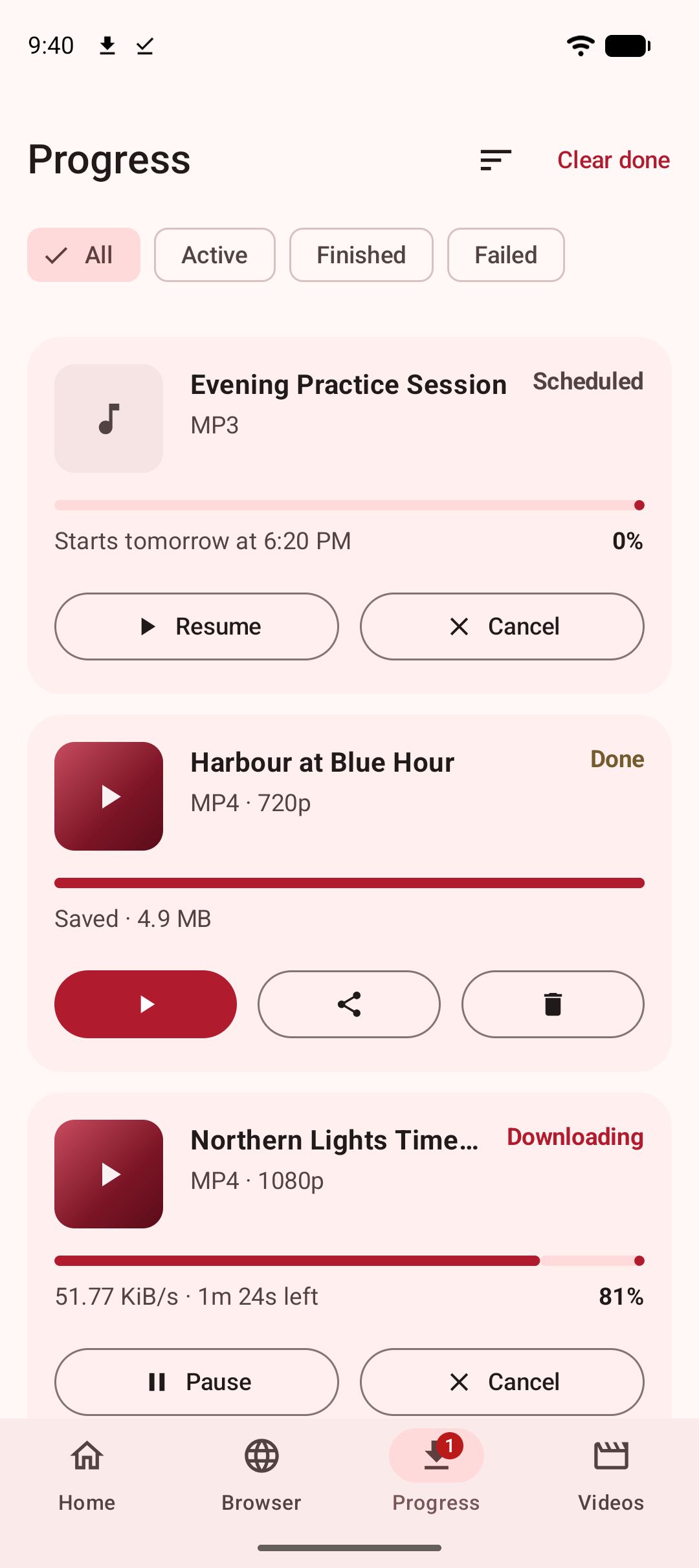
- Let it finish. Progress shows in the notification shade and on Kite’s Progress tab. The finished file lands in a Kite folder inside the phone’s Download folder, where gallery and file apps can see it.
Three situations change what the sheet does. With Wi-Fi only switched on in Kite’s settings and the phone on mobile data, the sheet stays open to say the download will start once you are on Wi-Fi, with a button to start it anyway. With Quick download switched on and a default quality chosen, there is no list at all: the download starts at your default and a one-line message confirms it. And a playlist link shows “Choosing which items to save needs a bit more room.” with an Open in Kite button, which opens Kite on its Home tab with the playlist read and ready to pick from. Our guide to downloading multiple videos at once covers playlists and batches.
Two more shortcuts
The Quick Settings tile
Copy a link anywhere, pull down the Quick Settings panel and tap Paste & download. The same sheet rises over whatever you were doing, with the same choices. Android never adds an app’s tile to the panel by itself, so it starts out hidden. On Android 13 and newer, open Kite’s Settings and tap Quick Settings tile, and Android asks whether to add it. On older versions, open the Quick Settings editor and drag Paste & download into the panel. If nothing is on the clipboard, the tile answers “Copy a link first, then tap the tile” and gets out of the way. If the phone is locked with a PIN, pattern or password, Android asks for it first.
Paste inside Kite
Open Kite and tap Paste on the Home tab: the link goes into the box and Kite starts reading it in a single tap. If you would rather not tap even that, switch on Auto-paste links in Settings, and Kite pastes a copied link each time it opens. It is off until you choose it, because on Android 12 and newer a clipboard read makes the system show a message of its own, which no app can switch off.
If it does not work
Kite is not in the share menu
Kite accepts shared links, which apps send as text. An app that shares the video file itself, or a picture, will not list Kite. Look for Copy link in that app’s share menu instead, then use the tile or the Paste button.
The sheet says the link could not be read
The sheet names the reason: a private or deleted post, a page that needs a login, a region block. If what you shared held no link at all, only a caption, the sheet shows the text that arrived so you can see why. To test a link, open it in a browser while signed out; if the video will not play there, Kite cannot reach it either.
The download waits instead of starting
Either Wi-Fi only is on and the phone is on mobile data, or you set a start time in the sheet. Both show on the download’s row in the Progress tab, and both can be started by hand from there.
The legal bit
Save only videos you own or have permission to save, and respect each site’s terms and the rights of the people who made them. A shorter route does not change the rules. Kite does not bypass copy protection of any kind: material protected by DRM is declined rather than downloaded. And some apps advertise coverage of certain large video and music platforms that Google Play policy does not allow downloader apps to touch; Kite deliberately excludes them.
For the details that differ by site, see our guides to TikTok videos without a watermark, saving Instagram Reels and X (Twitter) videos. Our complete guide to downloading videos on Android covers everything from the beginning.