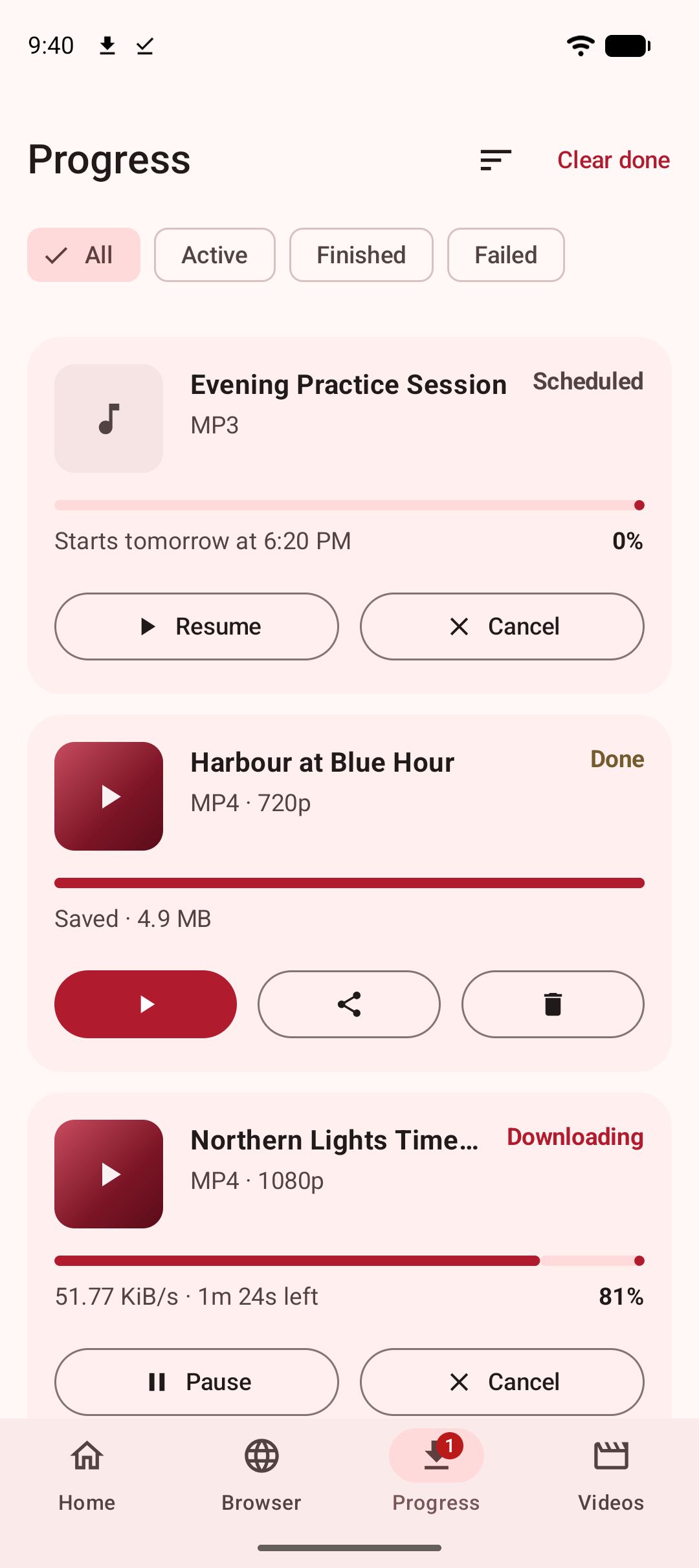
YTDLnis and Kite: Video Downloader run the same extraction engine — yt-dlp, working entirely on the phone — and then head in opposite directions. YTDLnis is the power user’s downloader, with the longest download-feature list in this category: per-item playlist editing, scheduled queues, cookie logins, SponsorBlock, custom commands, even a built-in terminal. Kite is the simpler all-rounder: installed from Google Play, driven by a pasted link or a media-sniffing browser, with a proper player and an encrypted Private Vault built in. If you want maximum control over downloads, YTDLnis wins that dimension. If you want a downloader that behaves like a normal Android app, Kite is the easier fit.
Kite is our app, so read the verdicts here as our honest, sourced case rather than a neutral review. Everything we say about YTDLnis comes from its GitHub README, and everything about Kite from its own site and Google Play listing; claims are dated as of August 2026, and the sources sit at the end of the page.
At a glance
| YTDLnis | Kite: Video Downloader | |
|---|---|---|
| Distribution | GitHub, F-Droid, IzzyOnDroid, Uptodown — its README calls these the only trusted sources | Google Play |
| Price model | Free and open source, donation-funded | Free with ads |
| Minimum Android | 7.0 | 7.0 |
| MP3 extraction | Yes, audio downloads via yt-dlp | Yes |
| Built-in browser or site search | Not advertised (share-menu card per its README) | Yes, media-sniffing browser |
| Player | Not advertised in its README | Yes: PiP, gestures, queue, background MP3 |
| Private vault | Not advertised | Yes, PIN-locked and encrypted |
| Account required | Not stated in its README; cookie logins are optional | No account |
| DRM stance | Not stated in its README | Declines DRM-protected material |
Where a YTDLnis cell says “not advertised” or “not stated”, its README simply does not mention the feature; we have not guessed in either direction.
What YTDLnis does
YTDLnis is a free, open-source video and audio downloader for Android, created by Denis Çerri and released under the GNU GPL v3.0. It uses yt-dlp to download from more than 1,000 websites, requires Android 7.0 or above, and is funded by donations rather than a price tag. Development is active, with commits as recent as August 2026. It is not on Google Play — its README names GitHub releases, F-Droid, the IzzyOnDroid repository and Uptodown as the only trusted places to get it.
The README’s download options run deeper than anything else we have compared. Playlists get per-item processing: edit every item separately, apply a shared format, path or filename template, or batch-switch items between audio, video and custom commands. There is a queue with scheduling by date and time (including several items at once), multiple simultaneous downloads, and batch import of links from a .txt file. Downloads can be cut by timestamps or chapters — an experimental yt-dlp feature — or split into chapters; subtitles, metadata and chapter marks can be embedded, and titles and authors edited. Cookie support lets you sign in with your own site accounts to reach private or otherwise unavailable videos, and SponsorBlock can strip sponsored segments or embed them as chapters.
Beyond that sit the real power tools: custom yt-dlp commands and templates with backup and restore, a built-in terminal, download logs, incognito and quick-download modes, and a plugin system for swapping in Python and JavaScript runtimes, FFmpeg and aria2c. A share-menu bottom card downloads without opening the app at all.
What Kite: Video Downloader does
Kite: Video Downloader is a free downloader on Google Play for Android 7.0 and newer, with no account or sign-up. It runs the same engine, yt-dlp, entirely on the phone. Paste a link and Kite works out what is on the page, then lists every resolution the source offers — SD up to 4K, with container, codec and estimated size — or extracts the audio as an MP3 with title and artist metadata embedded. It recognises media pages from TikTok, Instagram, X (formerly Twitter), Reddit, Facebook, Vimeo, Twitch and Pinterest, plus a thousand or so other sites. When there is no clean link, the built-in browser spots playable media on pages as you browse and offers to save it.
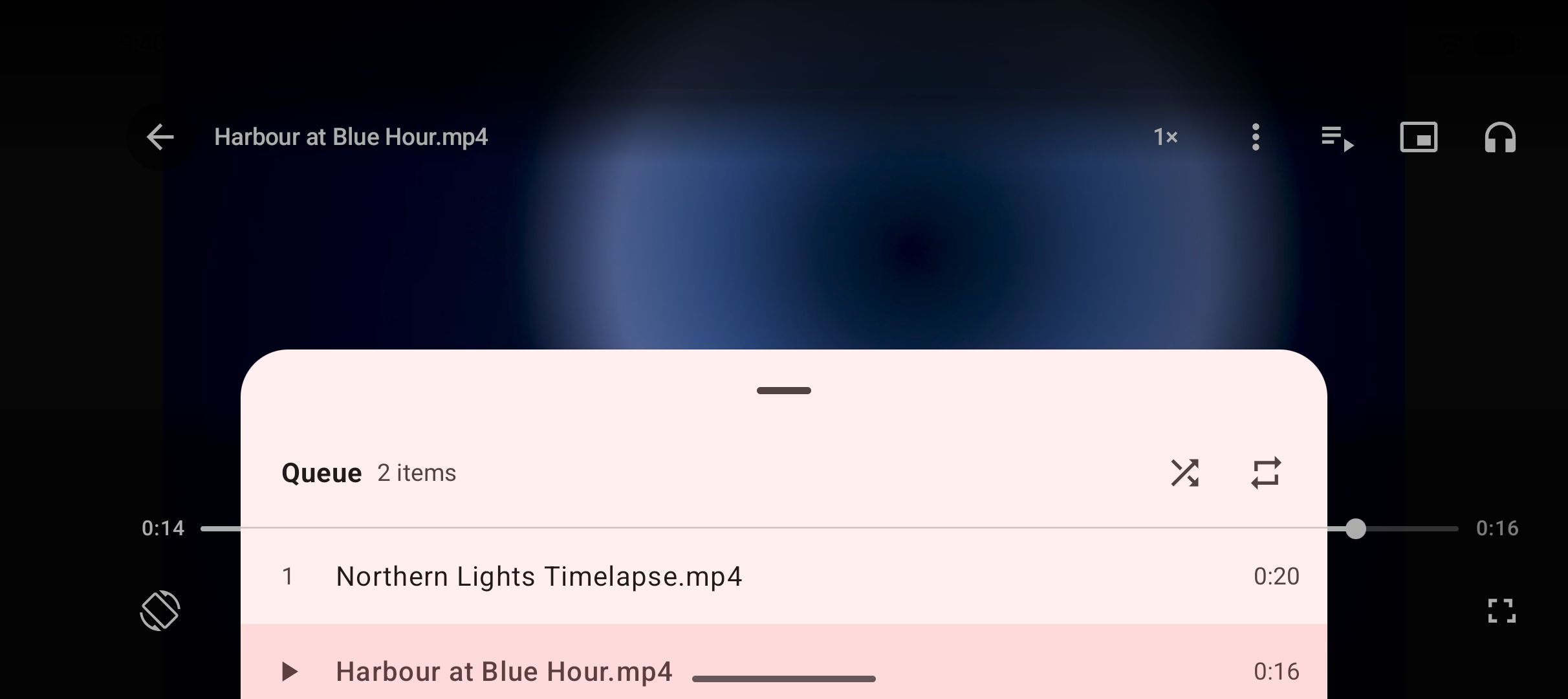
Downloads run up to three at once with live speed and ETA in the notification shade; they pause, resume and cancel, keep running in the background, and survive closing the app. There is a Wi-Fi-only option, scheduled downloads, a trim range for saving part of a video, subtitle embedding, and playlist links expanded and offered item by item. Where YTDLnis stops at the download, Kite keeps going: a built-in player with swipe gestures, picture-in-picture and a queue; background MP3 playback with lock-screen controls; a searchable library of everything saved plus the phone’s existing video and music; and a PIN-locked Private Vault where files are encrypted, hidden from the gallery, and stay on this device.
Two honest caveats. Kite is supported by ads — banners and the occasional interstitial — while YTDLnis is open source and donation-funded. And there are certain large video and music platforms that Google Play policy does not allow downloader apps to touch; Kite deliberately excludes them. Kite does not bypass copy protection of any kind: material protected by DRM is declined rather than downloaded.
Feature by feature
Downloading and formats
Site coverage is close to a draw, because both apps stand on yt-dlp: the YTDLnis README claims more than 1,000 websites, and Kite recognises a thousand or so sites through the same engine. The gap is in the options around a download. YTDLnis exposes far more of the engine — per-item playlist editing, cuts by timestamp or chapter, chapter splitting, metadata and title editing, SponsorBlock, stacked searches, and custom commands for whatever has no switch in the UI. Cookie logins for private or premium-format content are an advertised YTDLnis feature that Kite’s own materials do not claim. Kite covers the everyday cases with fewer decisions: a quality picker from SD to 4K, MP3 extraction with metadata, a trim range, subtitle embedding, scheduling and a Wi-Fi-only mode — and it converts videos you already saved to MP3, a flow our guide to turning a video into an MP3 on Android walks through.
Player
The cleanest split between the two. The YTDLnis README does not advertise a player: it downloads, and playback is left to whatever apps you already use. Kite treats playback as half the job. Its player gives saved videos swipe gestures for brightness, volume and seeking, hold-for-double-speed, ±10-second skips, picture-in-picture and a queue of the videos saved alongside; saved MP3s keep playing with the screen off, with controls on the lock screen, in the notification shade and over Bluetooth. If you prefer assembling your own toolchain, YTDLnis fits that approach; if you want one app to do the whole loop, that is Kite’s pitch.
Privacy and accounts
Kite needs no account, runs no analytics of its own and has no Kite server; downloads, history and settings stay on the device. Its ad partners do receive the device advertising ID, IP address and basic device details, which its privacy policy spells out. The YTDLnis README does not state an account requirement either way; the logins it advertises are optional cookie sign-ins with your own site accounts for reaching private content, and it lists an incognito mode. Kite’s extra here is the Private Vault — PIN-locked, encrypted, hidden from the gallery and kept on this device — which the YTDLnis README does not advertise.
Ads and price
Both cost nothing to install or use; the models behind that differ. YTDLnis is free and open source under the GPL, funded by donations through GitHub Sponsors and Buy Me a Coffee, as of August 2026. Kite is free with ads — banner ads and occasional interstitials from third-party partners — and sells no subscription or paid tier. Honestly, donation-funded open source is the easier model to recommend; if that weighs most with you, YTDLnis and Seal, which we compare separately, both offer it. Ads are what keep Kite free on Google Play without accounts, tiers or upsells.
Distribution and updates
YTDLnis is not distributed on Google Play. Its README names GitHub releases, F-Droid, the IzzyOnDroid repository and Uptodown as the only trusted sources, as of August 2026. In practice that means adding a repository to an F-Droid client, which can then handle updates, or downloading APKs yourself and updating by hand; the project is active, with commits as recent as August 2026. Kite installs from Google Play and updates through the store like the rest of your apps — no sideloading step, no unknown-sources setting. How the whole field distributes is a theme of our round-up of the best video downloader apps for Android.
Which should you use
Pick YTDLnis if the download options are the point. Per-item playlist control, scheduled batches, cookie logins, SponsorBlock, cuts by timestamp, custom yt-dlp commands, a terminal, plugin runtimes: nothing else in this category matches that depth, and we will not pretend Kite does. The price of that depth is the setup — an F-Droid or GitHub install, updates managed outside Play, and an interface with far more decisions in it.
Pick Kite if you want the short path. Install from Google Play, paste a link or browse in-app, choose a quality, and then watch or listen inside the same app — with a PIN-locked, encrypted vault for the files you would rather keep out of the gallery. You accept ads as part of that deal, and you skip sideloading entirely.
One carve-out matters more than either feature list. If what you mainly want to save lives on certain large video and music platforms that Google Play policy does not allow downloader apps to touch, Kite is the wrong choice — it deliberately excludes them as a policy decision, not a gap it plans to fill. The YTDLnis README claims the full yt-dlp site list of more than 1,000 websites; for that reader, its coverage claim is the fact that settles the question.
Both need Android 7.0 or newer, so the phone itself rarely decides this one. Whichever you choose, use it the same way: save content you own or have permission to save, respect the terms of the sites you visit, and respect the rights of the people who made what you are watching.