People searching for a 4K video downloader on Android usually want the desktop program they already use. It has no Android edition. 4K Video Downloader Plus is a desktop app for Windows, macOS and Linux, with a free tier limited in download quantity and paid tiers from $15 per year or $25 one-time (as of August 2026). Its vendor does sell a separate Android downloader from its own site, but that is a different product from the desktop one. Because the desktop name is well known, check the publisher before installing a phone app with a similar name.
So the useful question is not how to run the desktop app on a phone, but which phone-native app covers the parts of it you actually used. This guide compares three: Kite: Video Downloader, Seal and YTDLnis. Kite is our app, so read the verdicts here as our honest, sourced case rather than a neutral review. Every claim about another app comes from its own product page, repository or listing, dated as of August 2026.
One scope difference decides whether the rest of this is useful to you. The desktop product’s page prominently advertises coverage of certain large video and music platforms that Google Play policy does not allow downloader apps to touch. Play policy does not govern desktop software; it does govern every app in the Play store. Kite deliberately excludes those platforms, as does anything else distributed through Play. If they were the reason you used the desktop app, nothing here replaces it.
What to look for
- Install path and updates. A Play app updates itself, F-Droid updates what you installed from it, and a bare APK updates only when you fetch the next build. Downloaders age badly without updates, because the sites they read keep changing.
- Resolution, formats and MP3. Check what the picker actually shows: resolutions, container, codec, and whether audio comes out as a tagged MP3 or a bare file.
- Download management. A queue, pause and resume, a Wi-Fi-only switch and scheduling decide how the app behaves on a metered or unreliable connection.
- Playback. Some downloaders hand files to whatever player the phone has; others bundle one with gestures, background audio and a queue.
- Privacy features. If some saves should not sit in the shared gallery, look for a locked space, and read what each listing says about data collection.
What carries over from the desktop app, and what does not
- Paste a link, pick a quality. Carries over completely: all three are paste-a-link tools with a format list.
- Playlists. Carries over in different shapes: Seal in one click, YTDLnis with per-item editing, Kite by expanding the link and offering items one by one. Channels and search-result batches do not: nothing here crawls a whole channel.
- Auto-download subscriptions. Does not carry over; none of the three advertises new uploads arriving on their own. Kite’s scheduled downloads only choose when a queued download starts, not what joins the queue.
- Smart Mode presets. No direct equivalent. The nearest is a custom yt-dlp command template in Seal or YTDLnis; Kite keeps the choice per download.
- Subtitles. The desktop app exports SRT files in over 50 languages. On the phone side, all three embed subtitles into the video file instead.
- 8K, 3D and 360, AI vocal removal, built-in proxy. None of the three offers them, per their own pages. Kite’s picker lists SD up to 4K; Seal and YTDLnis pass through whatever formats yt-dlp reports.
- Login-protected pages. The desktop app puts this behind its paid licence. On the phone, Kite has a media-sniffing browser, and YTDLnis lists cookie support for private or premium formats.
The Android alternatives
Kite: Video Downloader
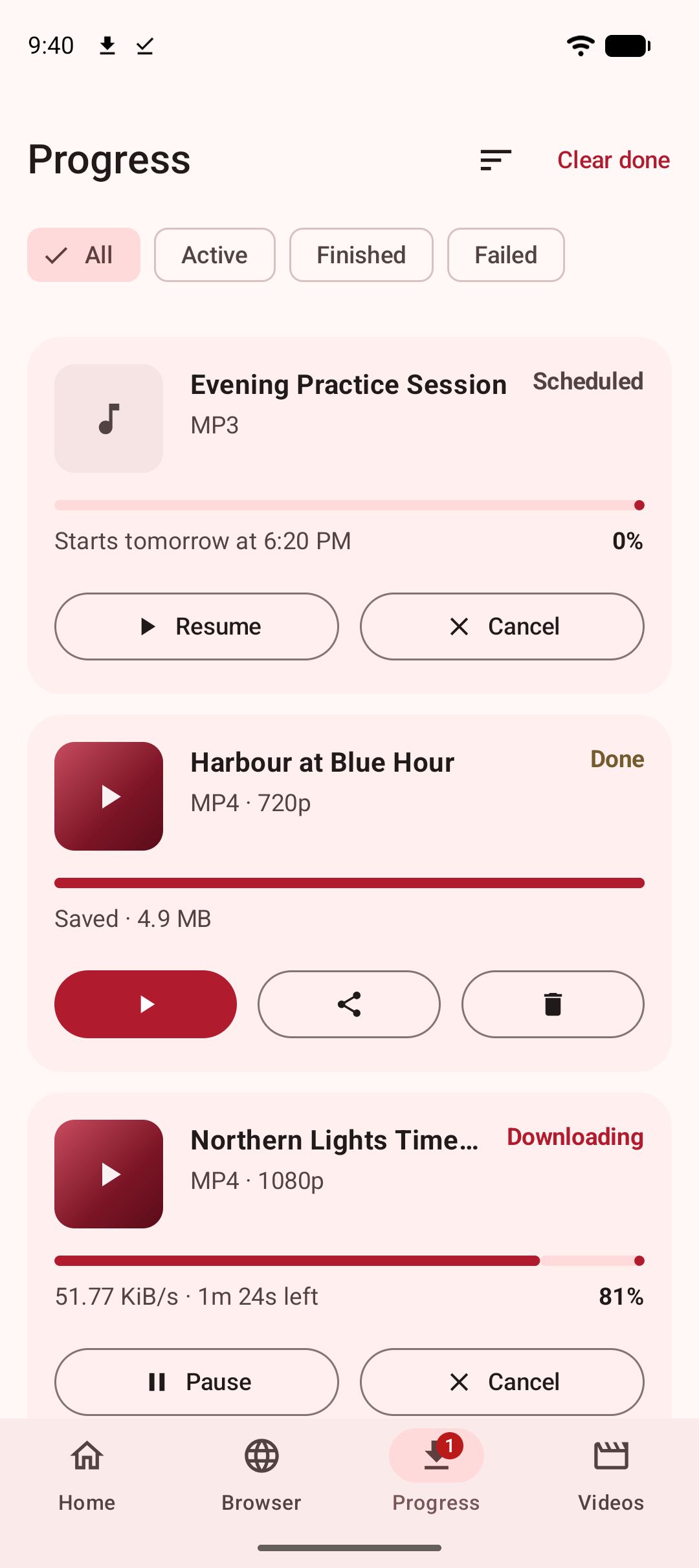
Kite is free, needs Android 7.0 or newer and asks for no account or sign-up. Paste a link and Kite works out what is on the page, then lists every resolution the source offers — SD up to 4K, with container, codec and an estimated size beside each option — or pulls the audio out as an MP3 with title and artist metadata embedded. A built-in browser spots playable media on pages and offers to save it. Downloads run up to three at once with live speed and ETA in the notification shade, pause and resume, survive closing the app, and can be scheduled or held to Wi-Fi; a trim range saves part of a video rather than all of it. The player has swipe gestures, hold-for-double-speed, picture-in-picture and a queue, and saved MP3s keep playing with the screen off. A PIN-locked, encrypted Private Vault keeps chosen files hidden from the gallery and stays on this device.
The honest negatives. Kite is supported by ads — a banner and an occasional interstitial through third-party partners — with no paid tier that switches them off. Its coverage is TikTok, Instagram, X (formerly Twitter), Reddit, Facebook, Vimeo, Twitch and Pinterest plus a thousand or so other sites through yt-dlp, with the large platforms described above deliberately excluded. Kite does not bypass copy protection of any kind: material protected by DRM is declined rather than downloaded.
Seal
Seal is a free, open-source Android downloader built on yt-dlp, distributed through GitHub releases and F-Droid (as of August 2026). It is GPL-3.0 licensed and funded by donations; no Play listing appears among its official download channels, so installs and updates go through F-Droid or GitHub. The feature set is deliberately small: Seal embeds metadata and the video thumbnail into extracted audio, embeds subtitles into videos, downloads a whole playlist in one click, can hand transfers to an embedded aria2c, and accepts custom yt-dlp command templates.
The newest F-Droid build is 1.13.1, added in January 2026, and it requires Android 5.0 or newer; F-Droid notes that the app relies on the GitHub API to check for and fetch yt-dlp engine updates. If what you liked was paste, choose, done — with one-click playlists — Seal is the closest simple match.
YTDLnis
YTDLnis is a free, open-source Android downloader that uses yt-dlp and runs on Android 7.0 and above (as of August 2026). Its README names GitHub, F-Droid, IzzyOnDroid and Uptodown as the only trusted sources. It is the closest thing here to the desktop app’s power-user half. Playlist processing lets you edit every item separately, set a shared format, path and filename template, and switch items in bulk between audio, video and a custom command. There is a download queue with scheduling by date and time, several downloads at once, cookie support for logging in to fetch private or premium formats, SponsorBlock handling that removes sponsored segments or embeds them as chapters, cutting by timestamps or chapters, a built-in terminal for custom yt-dlp commands, and .txt batch import of links.
The repository showed active development, with commits as recent as August 2026. The price of all that reach is a busier interface, plus the same sideload install path as Seal.
Saving in 4K on a phone
Three things decide whether a 2160p save is worth it, and the app is only one of them. The source has to publish that resolution: a downloader lists what the page offers and cannot invent a higher one. Kite shows the full list with an estimated size against each entry, which is where to make the call.
The codec matters as much as the number, because a phone that decodes one in hardware may fall back to software for another, and that is where dropped frames and a warm battery come from. When in doubt, take the MP4 option with H.264 video: widest compatibility, larger file. Storage is the third: a 2160p file is much larger than the 1080p version of the same clip, and on a phone screen 1080p usually looks the same in the hand. Whatever you save still has to play, and our roundup of offline video players for Android covers what handles which files.
Side by side
Competitor rows summarise each app’s own page, repository or listing, as of August 2026.
| Feature | 4K Video Downloader Plus | Kite | Seal | YTDLnis |
|---|---|---|---|---|
| Runs on | Windows 11+, macOS 12+, Ubuntu 22.04+ (GNOME) | Android 7.0+ | Android 5.0+ | Android 7.0+ |
| Price model | Freemium: free tier limited in quantity, $15/year Lite, $25 Personal, $60 Pro | Free with ads, no subscription | Free, open source; donations | Free, open source; donations |
| Playlists | Playlists, channels and search results in one click; auto-download subscriptions | Playlist link expanded, offered item by item | Whole playlist in one click | Per-item editing, shared templates, batch switching |
| MP3 | MP3, M4A and OGG audio extraction | MP3 with title and artist tags | Audio with metadata and thumbnail embedded | Audio with metadata, chapters and subtitles embedded |
| Where to get it | Installers from its own site | Google Play | GitHub releases, F-Droid | GitHub, F-Droid, IzzyOnDroid, Uptodown |
Bottom line
There is no single winner, because the desktop app did several jobs and no phone app does all of them.
- You mostly pasted a link and picked a quality. All three do that. Choose on install path: Kite through Google Play, Seal and YTDLnis through F-Droid or GitHub.
- Playlists were the reason you used it. YTDLnis, for per-item editing, shared templates and scheduling. Seal if one click per playlist is enough.
- You relied on auto-download subscriptions or whole channels. Nothing here replaces that; keep the desktop app for that job.
- You want a player and a locked space in the same app. Kite bundles the player, queue, background MP3 and the PIN-locked Private Vault. The trade is ads and the deliberate platform exclusions.
- You want open source, funded by donations rather than advertising. Seal for a tidy flow, YTDLnis for control. Both update through F-Droid once installed from it.
- Audio is most of what you save. Our guide to the best video to MP3 apps for Android compares the tagging and quality choices.
For the wider field beyond desktop replacements, see our roundup of the best video downloader apps for Android. Whichever app you land on, the ground rules stay the same: these are tools for personal use, so save only content you own or have permission to save, respect the terms of the sites you visit, and respect the rights of the people who made what you are watching.