People usually look for TubeMate alternatives because of how it installs, not because of what it does. TubeMate is installed by downloading an APK from tubemate.net or a third-party store such as Uptodown, not from Google Play (as of August 2026). Its own website tells users to ignore the Google Play Protect warning that appears during installation (as of August 2026) — a notice printed on the site itself, and the point where many people start searching. The second reason is quieter: with no store behind it, each new build is a manual download and reinstall, and downloaders age badly without updates.
Search results for this question steer towards desktop programs. You do not need a computer to replace TubeMate; all six options below run on the phone — one app on Google Play (Kite: Video Downloader), two open-source projects (Seal and YTDLnis) and three fellow sideloads (Snaptube, VidMate and Videoder). Kite is our app, so read the verdicts here as our honest, sourced case rather than a neutral review. Every competitor claim comes from that app’s own listing, site or repository, as of August 2026.
What to look for
- Install path and updates. A Google Play app updates itself in the background; a sideloaded APK updates only when you fetch the next build yourself.
- Formats and MP3. Check which resolutions are offered, and whether audio arrives as a tagged MP3 or a bare file.
- Download management. Pause and resume, a queue, a Wi-Fi-only switch and scheduling decide how the app behaves on a slow or metered connection.
- Playback and privacy. Some downloaders hand finished files to whatever player the phone has; others bundle a player with gestures and background audio, or a locked space for private saves.
The six alternatives
Kite is first because it is ours; the open-source pair follow, then the sideloads.
Kite: Video Downloader
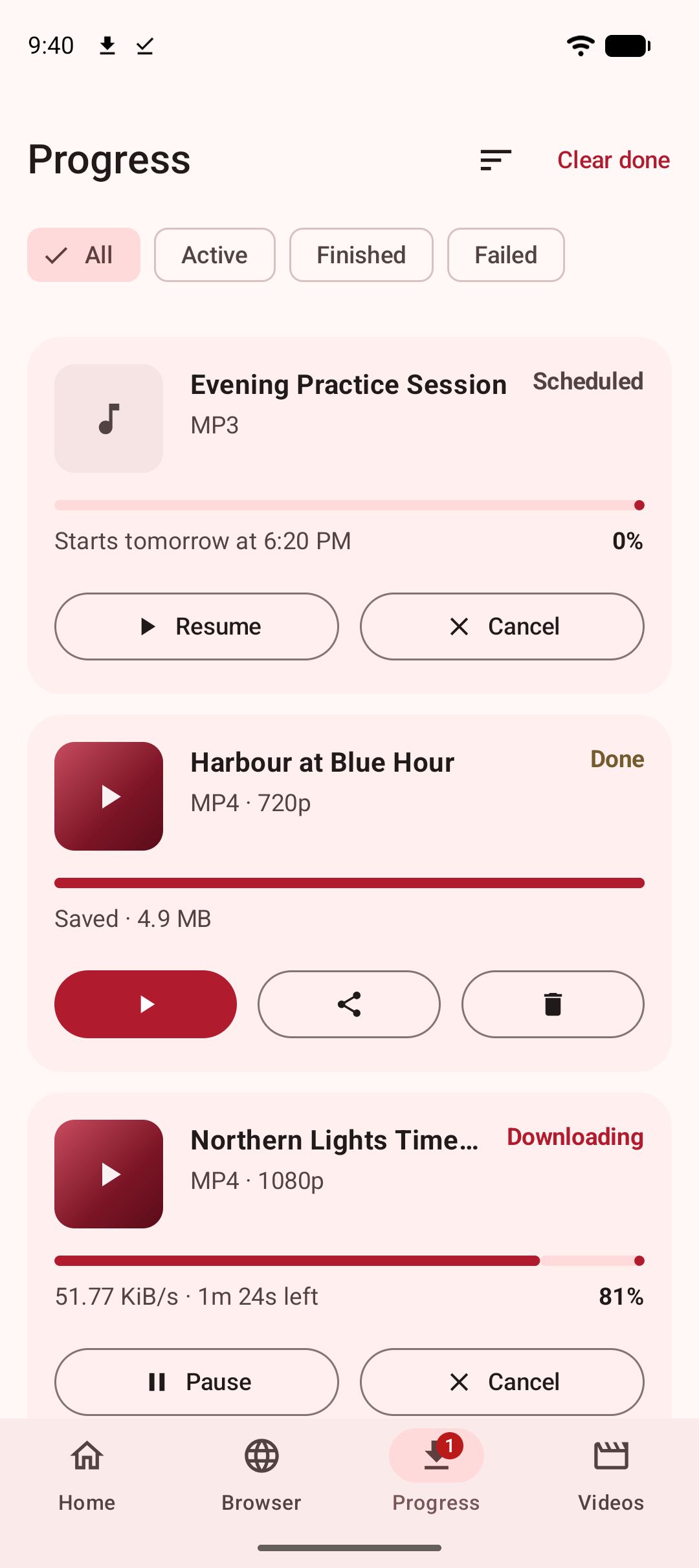
Kite: Video Downloader is free, needs Android 7.0 or newer, and asks for no account. Paste a link and Kite works out what is on the page, then lists every resolution the source offers, from SD to 4K, with container, codec and estimated size. Audio comes out as an MP3 with title and artist tags embedded, subtitles can be embedded in video, and a playlist link is offered item by item. A built-in browser recognises playable media on pages and offers to save it. Downloads run three at a time with live speed and ETA in the notification shade, survive closing the app, resume after an interruption, and can be scheduled or held to Wi-Fi. The player adds swipe gestures, double-speed, picture-in-picture and a queue, saved MP3s keep playing with the screen off, and a PIN-locked, encrypted Private Vault hides chosen files from the gallery, on this device. Kite recognises media pages from TikTok, Instagram, X (formerly Twitter), Reddit, Facebook, Vimeo, Twitch and Pinterest, plus a thousand or so other sites through yt-dlp.
The honest trade-offs. Kite is supported by ads — a banner and an occasional interstitial through third-party partners — with no paid tier to remove them. Google Play also draws a boundary a sideload does not: certain large video and music platforms that Google Play policy does not allow downloader apps to touch are deliberately excluded. Kite does not bypass copy protection of any kind: material protected by DRM is declined rather than downloaded. For a feature-by-feature match-up, see TubeMate vs Kite.
Seal
Seal is a free, open-source Android downloader built on yt-dlp, distributed through GitHub releases and F-Droid (as of August 2026). It is GPL-3.0 licensed, funded by donations, and not on Google Play. The feature set is tidy: Seal embeds metadata and the video thumbnail into extracted audio, embeds subtitles into videos, downloads a whole playlist in one click, can use an embedded aria2c, and accepts custom yt-dlp command templates. The newest F-Droid build is 1.13.1, added in January 2026, for Android 5.0 or newer; F-Droid notes that Seal depends on the GitHub API to check for and fetch yt-dlp engine updates. If F-Droid is already on your phone, this is the simplest open-source switch.
YTDLnis
YTDLnis is the other open-source route: a free downloader that uses yt-dlp and runs on Android 7.0 and above (as of August 2026). Its README names GitHub, F-Droid, IzzyOnDroid and Uptodown as the only trusted sources. Where Seal stays simple, YTDLnis stacks up control: playlists whose items can be edited one by one, a queue with scheduling by date and time, several downloads at once, cookie logins for private or premium formats, SponsorBlock handling, custom yt-dlp commands with a built-in terminal, and batch link import from a .txt file. The repository showed active development, with commits as recent as August 2026. If you are leaving TubeMate wanting more settings rather than fewer, this is the one.
Snaptube
Snaptube is distributed as an APK through third-party stores such as Uptodown rather than through Google Play (as of August 2026). Its Uptodown listing describes a search-first downloader: type a video or channel name into a search box, then pick format and quality per result, with MP4 and MP3 output reaching 4K on some videos. Settings include a download-folder chooser, a speed limit and a Wi-Fi-only option. Uptodown’s editorial review notes that Snaptube may require a VPN before downloads appear in some regions. The current build is 7.63.0.76330710, dated July 2026, for Android 5.0 and newer.
VidMate
VidMate is the closest of these to a TubeMate-style all-in-one. It is distributed as an APK through third-party stores such as Uptodown rather than through Google Play (as of August 2026). Its listing describes a Sites tab with shortcuts to more than a dozen video pages, a floating download bubble that appears while a video plays, and MP3 or MP4 output up to 4K on some platforms. It also bundles a music player with playlists and a sleep timer, plus a Pop-Up mode that floats video over other apps. The current build is 6.0102, dated April 2026.
Videoder
Videoder is distributed as an APK through third-party stores such as Uptodown rather than through Google Play, and the newest Videoder build listed on Uptodown is version 14.4.2, dated August 2023 (as of August 2026). The listing describes a built-in search engine that combs multiple streaming video services, per-video quality from 240p to 1080p, and output in MP4, FLV and 3GP, with no audio format named. Extractors need regular updates to keep pace with the sites they read, so weigh that date first.
Side by side
Rows summarise each app’s own listing or repository, as of August 2026.
| App | Where to get it | Price model | MP3 | Standout | Notes |
|---|---|---|---|---|---|
| TubeMate | APK from tubemate.net or Uptodown | Free; monetisation not stated | Yes, plus AAC and OGG | Five output formats, optional 8K setting | Its site says to ignore the Play Protect install warning |
| Kite | Google Play | Free with ads | Yes, with title and artist tags | Quality picker, scheduling, encrypted Private Vault | Excludes the large platforms Play policy does not allow downloaders to touch |
| Seal | GitHub, F-Droid | Free, open source; donations | Audio with embedded tags | One-click playlists; subtitle and metadata embedding | Newest F-Droid build 1.13.1, January 2026 |
| YTDLnis | GitHub, F-Droid, IzzyOnDroid, Uptodown | Free, open source; donations | Audio downloads | Scheduling, cookie logins, custom yt-dlp commands | Commits as recent as August 2026 |
| Snaptube | APK via Uptodown | Free; monetisation not stated | Yes | Search-first flow; 4K on some videos | A VPN may be needed in some regions, per Uptodown |
| VidMate | APK via Uptodown | Free; monetisation not stated | Yes | Music player, sleep timer, Pop-Up mode | Restricted Mode off by default, per Uptodown |
| Videoder | APK via Uptodown | Free; monetisation not stated | Not stated on its listing | Built-in search across streaming services | Newest listed build dated August 2023 |
Bottom line
There is no single winner: people leave TubeMate for different reasons.
- You want the store to handle installs and updates. Kite is the one here on Google Play, and it bundles the player and the vault. Two honest costs: it shows ads, and it deliberately excludes certain large video and music platforms that Google Play policy does not allow downloader apps to touch.
- You want open source. Seal for a simple, tidy flow; YTDLnis for queues, scheduling, cookie logins and command-level control. Installed from F-Droid, both update through it.
- You want a sideload, just a different one. Snaptube if you prefer searching inside the app, VidMate for the download bubble and the bundled music player. Both keep the manual update cycle.
- You want TubeMate’s exact format spread. Nothing here matches MP4, MP3, AAC, OGG and WEBM plus an 8K setting, so decide whether you have ever used more than two of them.
- Videoder. Weigh the August 2023 build date before anything else.
For the wider field, see our roundup of the best video downloader apps for Android; if clips from X are most of what you save, the guide to downloading videos from X covers that job. Whichever app you choose, the ground rules stay the same: these are tools for personal use, so save only content you own or have permission to save, respect the terms of the sites you visit, and respect the rights of the people who made what you are watching.